

When to Replace Ear Cushions at Work: A Practical Policy for Hygiene, Comfort, and Equipment Upkeep
Posted by Quentin Vernon on 3rd Nov 2025
When to Replace Ear Cushions at Work: A Practical Policy for Hygiene, Comfort, and Equipment Upkeep
Why Ear Cushion Replacement Matters
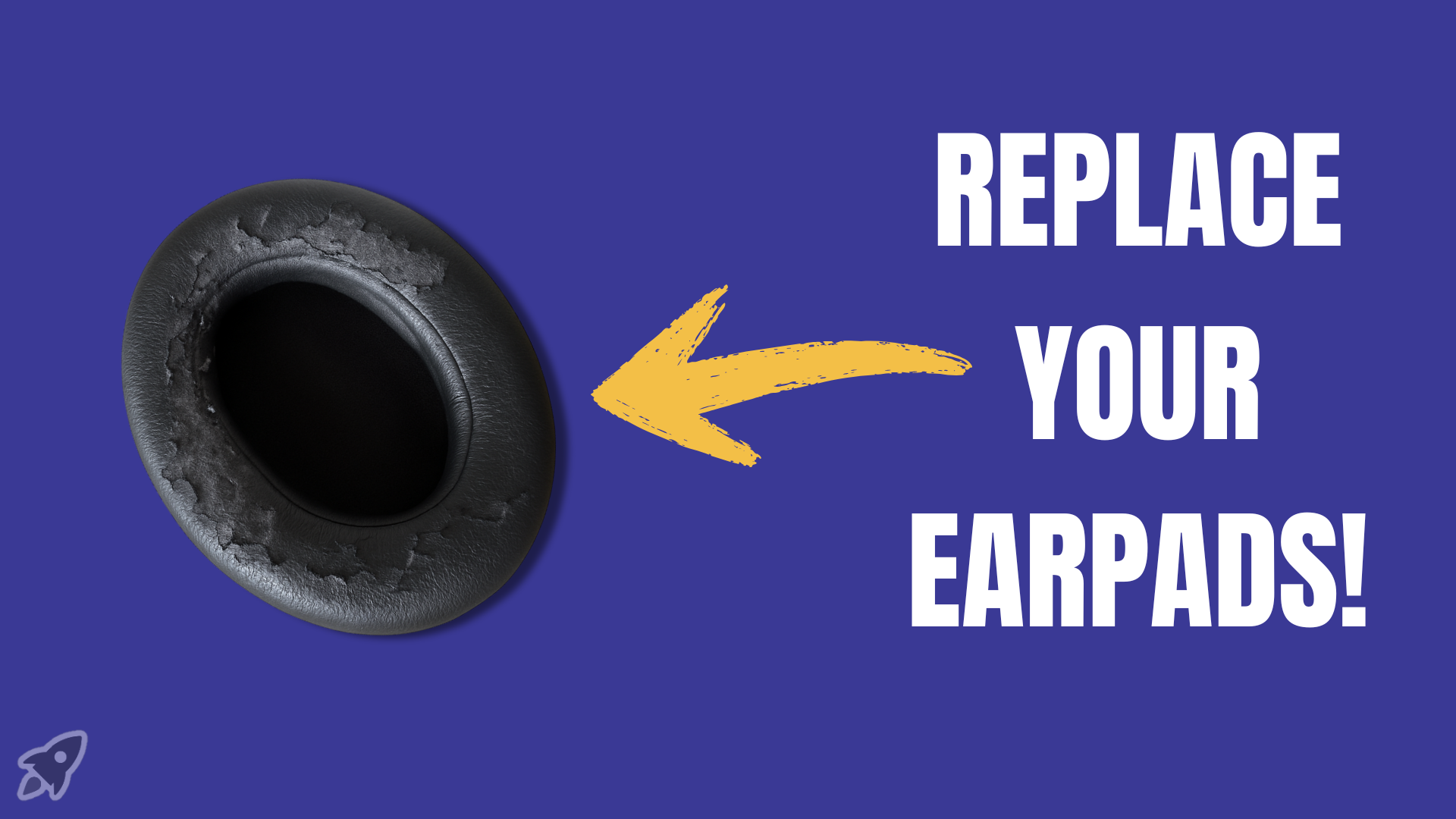
Ear cushions are a maintenance item. In busy workplaces, they collect sweat, soil, and daily wear. Over time they can crack, flatten, harden, or lose their shape. Once that happens, cleaning is not always enough.
For hearing-protection earmuffs and safety communication headsets, cushion condition is more than a housekeeping issue. It affects hygiene, inspection, and ongoing equipment upkeep. For office and call-center headsets, the case is narrower but still practical: ear cushions are removable contact surfaces that should be cleaned and replaced when they become worn, damaged, or difficult to keep clean.
1) Hygiene Gets Worse as Cushions Wear Out
Shared-use equipment creates an obvious hygiene burden. Once cushions become visibly worn, persistently soiled, or harder to clean, the problem stops being routine maintenance and starts being a replacement issue.
This is the practical standard employers should use: if a cushion is cracked, heavily worn, or no longer easy to keep hygienic, replace it. Continuing to scrub degraded parts is usually wasted effort.
2) For Hearing Protection, Cushion Condition Affects Function
When the cushion degrades, the seal can degrade with it. Cracks, flattening, hardening, or leakage can interfere with fit and make the equipment less reliable in use. If the product depends on a proper seal, worn cushions are not just cosmetic. They are a maintenance problem that can affect performance.
3) Damaged Equipment Should Not Stay in Service
A workplace does not need a complicated argument about obviously worn parts. If cushions are cracked, loose, leaking, or heavily degraded, they should not remain in active use.
This matters most in environments where hearing protection is part of the broader safety program, but the same operational logic applies to shared headsets: damaged contact surfaces create unnecessary friction, complaints, and avoidable replacement delays.
What to Replace, and When
A useful policy does not need fake precision. It needs clear replacement triggers.
- Cracks, splits, or tears
- Flattening or visible loss of shape
- Hardening, brittleness, or leakage
- Persistent soil or odor after cleaning
- Loose attachment or poor fit on the device
- User complaints that point to obvious wear or degraded condition
For hearing-protection products, a scheduled replacement check makes sense, especially in heavy-use, shared-use, or harsher environments. For office headsets, the move is simpler: clean routinely and replace cushions when they are worn, damaged, or no longer easy to keep clean.
A Simple Replacement Policy That Works
Scope
Applies to shared-use and assigned-use workplace headsets, hearing-protection earmuffs, and safety communication headsets with replaceable ear cushions.
Inspection Frequency
Inspect cushions during routine cleaning and at scheduled intervals based on usage level.
Replace Immediately If
- The cushion is cracked, torn, leaking, hardened, or loose
- The cushion remains visibly dirty or unhygienic after cleaning
- The seal or fit is visibly compromised on hearing-protection equipment
- The product manufacturer recommends replacement based on wear condition
Suggested Review Cycle
- Heavy daily use or shared equipment: inspect weekly, review replacement stock monthly
- Assigned individual use: inspect monthly
- Hearing-protection equipment in high-use environments: follow manufacturer guidance and maintain a scheduled replacement cycle
Ownership
Assign one function to own the process: safety, operations, facilities, IT, or procurement. Shared ownership is how this turns into neglect.
Stocking
Keep replacement cushions or hygiene kits on hand for active device models. If replacement parts are hard to identify, the device list is already broken.
Records
Where hearing conservation or PPE programs already require documented maintenance practices, keep ear-cushion checks inside that system. A basic internal log is useful operationally, even where a formal replacement log is not explicitly required.
Buying Replacements Without Creating a Mess
Most replacement problems are procurement problems. Before ordering, confirm the exact brand and model, whether the cushion is OEM-specific or part of a hygiene kit, and whether the device is ordinary office audio gear or certified hearing protection.
- Confirm the device brand and model
- Check whether the part is model-specific or universal
- Separate office headsets from certified hearing-protection products
- Note whether the equipment is shared or individually assigned
- Stock replacement parts for the models still in active use
If you skip this step, you get the usual result: mismatched parts, stranded inventory, and staff still using worn cushions because the right replacements were never sourced properly.
Bottom Line
Ear cushions are cheap. Neglecting them is not.
For hearing-protection equipment, worn cushions can undermine fit, hygiene, and ongoing performance. For office headsets, worn cushions remain a maintenance issue worth managing because they become harder to clean, less presentable, and less pleasant to keep in service. In both cases, a simple inspection-and-replacement routine is easier than waiting for complaints, audit friction, or worn-out gear to force the issue.
Video Overview
If the embedded video doesn’t load, watch it here.
Shop Replacement Pads & Accessories
If you are standardizing replacements across a team, start with model compatibility. The products below are useful only if they match the devices you actually have in service.
-

BlueParrott B450-XT Ear Cushions (Pair)
- Replacement cushions for B450-XT
- Useful for routine upkeep on active units
-

Universal Ear Pad / Headband Cushion
- Replacement option for compatible headset models
- Best used after confirming fit
-

BlueParrott B350-XT Ear Cushion
- Model-specific replacement for B350-XT
- Suitable for basic refresh and upkeep
-

BlueParrott C400-XT Ear Cushion
- Replacement cushion for C400-XT
- Useful where teams need spares on hand
-

Universal Mic Windscreens (BlueParrott, Plantronics, more)
- Accessory replacement for supported headset models
- Useful for shared-use equipment upkeep
Sources Consulted
This article draws on workplace safety regulations, regulator guidance, and manufacturer instructions related to PPE maintenance, hearing protection, and ear-cushion inspection and replacement.
- OSHA 29 CFR 1910.132 – Personal Protective Equipment: General Requirements
- OSHA 29 CFR 1910.95 – Occupational Noise Exposure
- 3M PELTOR ProTac III – User Instructions
- 3M PELTOR WS ALERT XP – User Instructions
- HSE – Noise-Induced Hearing Loss
- HSE – Advice on Issuing Hearing Protection
This content is intended as practical workplace guidance. Employers should also follow the specific care, inspection, and replacement instructions provided by the manufacturer of each device in service.
Need help matching replacement cushions to your exact headset model?
Contact Global Teck Worldwide