
What the Global Teck Blue Beacon USB-A Cable Range Extender Actually Is (And Why We Renamed It)
Posted by Quentin Vernon on 5th Jun 2026
What the Global Teck Blue Beacon USB-A Cable Range Extender Actually Is (And Why We Renamed It)
Some reviewers called our old product name deceptive. One said it's "just a cable for you to plug in YOUR blue-tooth dongle." Another called it a USB extension cord dressed up with marketing language. A third compared it to a string between two tin cans.
They were describing the product correctly. What was Blue Beacon Bluetooth Extender is a USB-A extension cable with a mounting clip. It doesn't contain a signal amplifier, a repeater chip, or any electronics of its own, and the old name implied otherwise. We've renamed it the Blue Beacon USB-A Cable Range Extender to reflect what's actually in the box.
The name was the problem. The product wasn't. A cable that relocates your existing Bluetooth dongle to a better position is not the same thing as a cable that does nothing, and that distinction is worth walking through if you're trying to fix dropped audio or a laggy wireless keyboard.
What's actually in the box
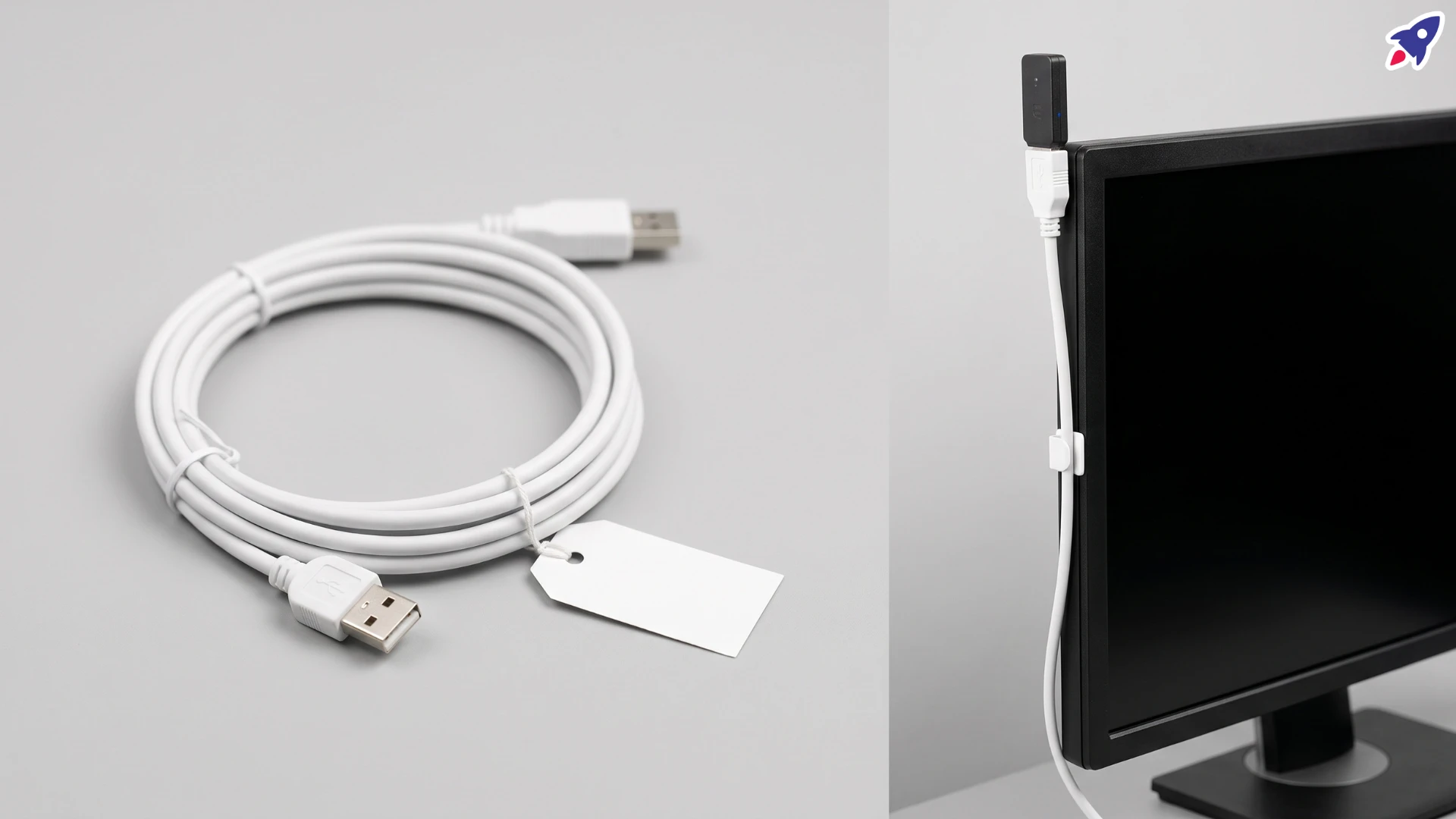
The base package contains two items: a USB-A extension cable, and a cable clip/holder designed to attach to the back of a computer or laptop monitor. Some bundles add a Poly MDA220 USB hub or a Poly BT600 Bluetooth dongle, but the core product, the cable and the clip, is what carries the Blue Beacon name. The current Amazon listing describes it as compatible with Jabra, Logitech, Poly, and Yealink dongles, which reflects what it is: a cable meant to work with the Bluetooth adapter you already own, not a specific one it ships with.
It's built to work with a USB-A Bluetooth adapter, and the base version doesn't include a dongle. Out of the box, you're not getting a Bluetooth radio at all. You're getting a way to move your own to a better spot.
That's a meaningfully different product than "Bluetooth Extender" suggested to a lot of buyers, and it's exactly where the one-star reviews came from.
Why the old name caused trouble
"Extender" and "Booster" are words people associate with active electronics. A Wi-Fi extender, for instance, contains its own radio and rebroadcasts a signal. A phone signal booster amplifies what it receives.
The Blue Beacon USB-A Cable Range Extender doesn't do either of those things. It's a passive cable. No amplification, no repeating, no additional radio. Anyone who plugged it in expecting the kind of boost a powered device would give was going to be underwhelmed, and the reviews above reflect exactly that expectation gap. It's the reason we changed the name.
But "passive cable" doesn't mean "useless for the problem," and that's worth explaining.
Why a plain cable can still fix a real problem
Bluetooth is a line-of-sight-sensitive, short-range radio technology. Most Bluetooth dongles plug directly into the back or side of a desktop tower, or into a laptop's side port. That's usually the worst possible spot for signal: behind a metal case, below desk height, surrounded by monitor cables, power bricks, and USB hubs, all of which can interfere with or physically block the signal from reaching your headset, keyboard, or speaker.
Our own product description puts it plainly: "Simply place the Blue Beacon above clutter or obstructions to create better line of sight."
That's the entire mechanism. The cable doesn't touch the signal at all. It moves the dongle's antenna from a cluttered, obstructed spot near the floor to an elevated, open spot, typically clipped to the top or side of a monitor, at head height and with a clear path to the device it's talking to. Less obstruction and better line of sight genuinely can reduce dropouts and improve range for Bluetooth specifically, because Bluetooth is unusually sensitive to both.
So the fair way to describe it: this is a cable that can meaningfully help, but only because of where it lets you put your existing dongle, not because of anything the cable itself does electronically.

What it won't do
Worth being just as direct about the limits, since overselling this in the other direction would repeat the same mistake as the old name.
- It won't rescue a bad or failing dongle. If the Bluetooth adapter itself is weak, damaged, or outdated, moving it to a better spot won't fix that.
- It won't extend range beyond what your dongle and device are rated for. You're not adding new Bluetooth capability. You're removing obstruction between the capability you already have.
- It doesn't come with a dongle in the base package. If you don't already own a USB-A Bluetooth adapter, or don't buy a bundle that includes one, the cable alone connects to nothing.
- It's not a data or charging speed upgrade. It's a standard extension cable. If your goal is faster USB data transfer, this isn't the product for that.
Who this is actually for
This product makes sense for a specific, common situation: you already own a Bluetooth headset, speaker, keyboard, or mouse with its own USB-A dongle, that dongle is currently plugged into a port that's low, blocked, or buried in cable clutter, and you're getting dropped audio, lag, or a flaky connection as a result.
If that's your situation, relocating the dongle a foot or two higher and clearing its line of sight is a legitimate, low-cost fix, and it's exactly what the clip and cable are built to do.
If you don't already have a dongle, or your Bluetooth problems are happening on a device with Bluetooth built directly into the motherboard rather than through a USB adapter, this product isn't going to be relevant to your setup at all.
What to check before you buy
- Do you already own a USB-A Bluetooth dongle? If not, look at a bundle that includes one, or buy the dongle separately.
- Is your dongle USB-A or USB-C? We sell both versions of the Blue Beacon; match the cable to your dongle's connector.
- Is your dongle brand supported? The current listing names Jabra, Logitech, Poly, and Yealink dongles as compatible; if yours is a different brand, confirm USB-A/USB-C compatibility before ordering.
- Is your current problem actually about line of sight? If your dongle already sits in an open, elevated spot and you're still getting drops, the issue is more likely the dongle, the device, or interference from something like a crowded 2.4GHz environment, not cable placement.
- Do you have a place to clip it? The clip is designed for the back or side of a monitor. Check your setup has a suitable edge or surface.
Frequently asked questions
Is the Blue Beacon USB-A Cable Range Extender a Bluetooth signal booster?
No. It's a passive USB-A (or USB-C) extension cable with a mounting clip. It contains no amplifier or additional radio. The product used to be named "Bluetooth Extender," which implied otherwise; we renamed it to be accurate.
Does it come with a Bluetooth dongle?
The base package does not. Some bundle listings include a Poly BT600 dongle or a Poly MDA220 USB hub alongside the cable and clip. Check the specific listing before ordering.
Will it actually improve my Bluetooth connection?
It can, if your current problem is caused by the dongle sitting somewhere with poor line of sight, low placement, or physical obstruction. Moving the dongle to a clear, elevated spot is the entire function of the product. It won't help if the problem is the dongle itself or something unrelated to placement.
Is this just a regular USB extension cable?
Functionally, yes; it's a USB-A extension cable. What differentiates it from a generic one is the included clip and the fact that it's positioned specifically for relocating Bluetooth dongles for better signal.
The takeaway
"Bluetooth Extender" was a name that implied electronics that aren't there, and the reviews calling that out weren't wrong about what the product physically is: a cable and a clip. Where the criticism missed the mark was treating that as proof the product can't help. Bluetooth is genuinely sensitive to obstruction and distance, and moving a dongle from behind a cluttered desktop tower to an open spot on top of a monitor is a real fix for a real category of dropped-connection problems. We've updated the name to the Blue Beacon USB-A Cable Range Extender so the product description matches what's actually in the box.
If you already own a dongle and your issue is placement, this solves it. If you don't own a dongle, or your issue is something else, a cable won't be the answer, no matter what it's called.
Video Overview
Need help troubleshooting a Bluetooth headset or dongle setup?
Contact Global Teck Worldwide